
As of what we’ve done through our Locomotion project so far, the issue we currently have is that the Ray Interactor and the Teleport Interactor are both teleporting us.
What we want to accomplish is to have the Teleport Interactor exclusively interact with Teleport-related objects while the Ray Interactor can interact with everything else. Good thing we have our handy dandy XR Interaction Toolkit.
When you’ve chosen the Teleport Interactor Object and are in the Inspector, under XR Ray Interactor, you’ll notice a section labeled “Interaction Layer Mask.” Within this section, there’s a dropdown menu that offers you the flexibility to select the specific layer you want the Teleport Interactor to interact with and also decide which layers to ignore.
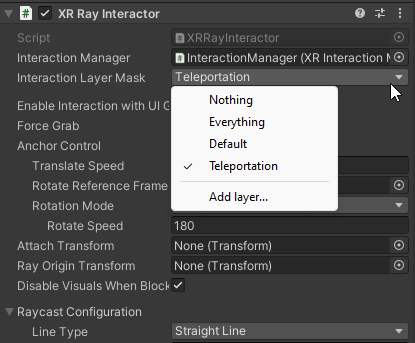
Note: You may have to create new layers to define what you want to be the Teleportation layer.
I have a Teleportation Anchor in my scene and I’ve created a Teleportation Layer. To enable the teleportation, I have to change the Interaction Layer Mask on the Teleport Anchor to the Teleport Layer.