
Before your raw video can be sent from OBS to a streaming platform (or recorded to your hard drive), it first needs to be downscaled and converted into a usable format. During that process, the detail is removed to shrink the video size down, which is where Rate Control comes in.
Choosing the right Rate Control will have a massive impact on the quality of your video, so knowing which is the right for your content is vital.
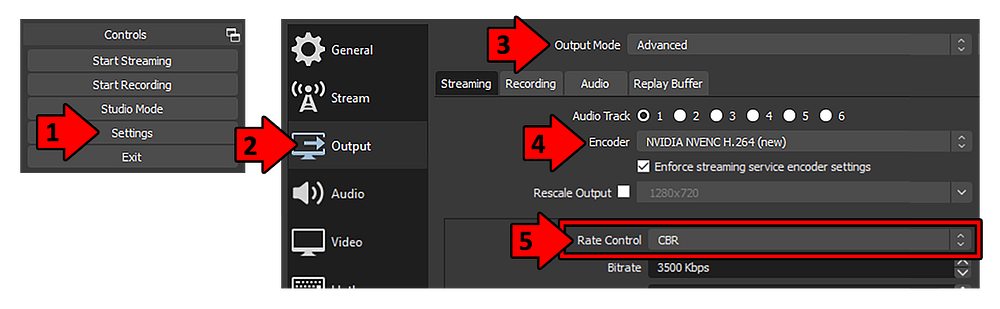
Follow these steps to manually select your Encoder, and in turn, choose your Rate Control.
To get started, open OBS then click Settings, then Output, and change the Output Mode dropdown menu from Simple to Advanced — this will allow you to manually select your Rate Control. The Encoder you choose will impact which Rate Controls are available to you, such as ABR which can only be used when x264 is your Encoder.
As a general rule, if you have an Nvidia graphics card you can (and should) choose NVENC, if you have an AMD graphics card and a mid-range CPU you should choose AMF, and if you have a fast CPU, like an AMD Ryzen 9 or an Intel i9, you should choose x264.