
What is CSS Art?
CSS art lies at the intersection of vector illustration and front-end development. It involves manipulating HTML <div> elements with CSS to render shapes in the browser. These shapes are customized by assigning values to various properties like height, border-radius, box-shadow and background-color. With countless CSS properties to work with, it’s possible to create intricate pieces without a vector illustration software like Illustrator.
It’s All About the Div
The <div> element is the building block of every pure CSS composition. A div is simply an empty container, often used to house other elements and create structure on a web page. It does not affect content or layout unless it’s styled with CSS or manipulated with scripts, making it extremely versatile. Take a look at the example below. Let’s break down the HTML portion of CSS art.
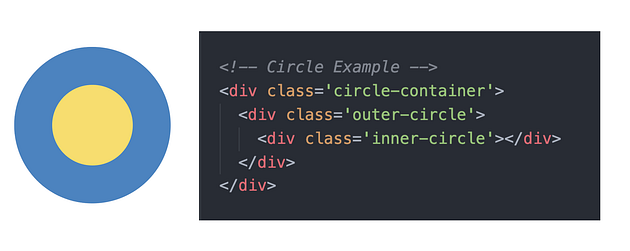
Graphic by Anna Pawl
- Parent <div>
Every CSS composition starts with a parent div. Think of it as your canvas. In the example above,<div class='circle-container>acts as an invisible box that encapsulates all other elements. - Child <div>
Styled child divs, which are nested within parent elements, give your composition structure and substance. Nesting elements is useful because you can position a child div relative to its parent. As your CSS skills improve, you’ll be able to create elaborate pieces with a single div. For now, break your vision down into simple parts and create a child div for every shape.