
In software development, productivity is often a function of how well you leverage the tools at your disposal. IntelliJ IDEA, a widely-used Integrated Development Environment (IDE), offers a plethora of features out-of-the-box. However, the true power of IntelliJ lies in its extensibility — its ability to integrate with a myriad of plugins designed to augment its capabilities.
Today, we will delve into three such plugins — KeyPromoterX, GitToolBox, and CodeGlance Pro — that have significantly impacted my coding workflow. These plugins, though seemingly trivial, offer nuanced functionalities that can streamline your development process in IntelliJ.
In the following sections, we’ll explore each plugin’s key features and their impact on coding tasks, along with setup tips for best performance.
CodeGlance Pro
The first plugin — CodeGlance Pro — introduces a highly useful feature to IntelliJ, one that you might already recognize from other IDEs like VSCode or Sublime Text: a code minimap.
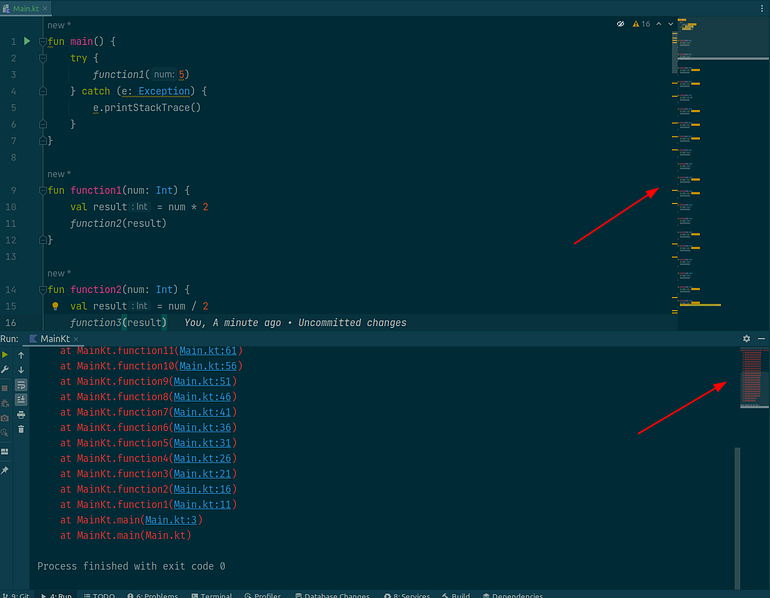
CodeGlance Pro generates a convenient minimap of your code, which serves as a quick visual guide to your code’s overall structure.
This feature allows you to effortlessly jump to specific sections or functions in no time, a real advantage when working with extensive files. Additionally, the minimap is smart enough to highlight lines that have compile errors or warnings, a detail that is illustrated in the above screenshot.