
Generative Artificial Intelligence allows us to generate new creative content in text, code, images, etc. This time, we are going to create a web application that allows us to create marketing content.
To do this, we will use the following tools:
- PaLM API: It is the interface that Google provides us to access the most advanced Large Language Models (LLMs) in the PaLM 2 family.
- Maker Suite: It is the web interface that allows us to interact with Generative Language Models to create prototypes more easily.
- Streamlit: It is a framework that allows us to create websites using Python.
Web App Overview
We are going to create an application to help promote Online Courses. The application has been designed under the following scheme:

Web App design
The idea is that the user inserts the name of the course they want to promote, and the PaLM API automatically delivers the creative marketing content to promote the result on Twitter, LinkedIn, and gives us the design guidelines to be able to create a poster or banner for the course.
Ok, let’s get to work. Let’s proceed to create the application.
Step 1. Create your PaLM API key.
In Maker Suite, go to the sidebar menu, select the “Get API Key” option, and then click on the “Create API key in new project” button.
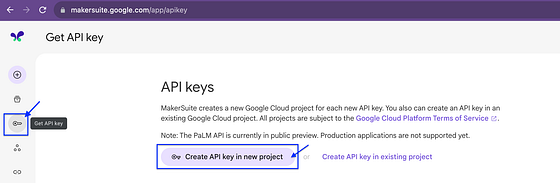
Generate your API Key and save it in a safe place. We’ll need it in the next steps.
Step 2. Let’s generate some sample content for promoting a course.
From the sidebar, select the option “Create New” and then select “Text prompt”.